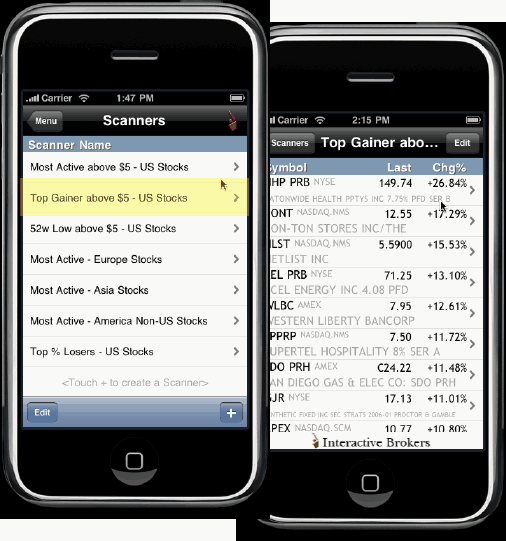
View the top 16 contracts based on the region, instrument, parameters and filtering criteria. You can choose to:
View one of our eight pre-defined scanners.
Edit a pre-defined scanner to use different criteria.
Create a new scanner by picking a region and instrument type (i.e. US Stocks, Europe Futures, Asia Indexes), choosing a scan type (availability based on instrument selection) and adding filter criteria if desired.
From the Main Menu, touch Scanners.
Touch a pre-defined scanner to view the top 16 contracts that meet the scan criteria.
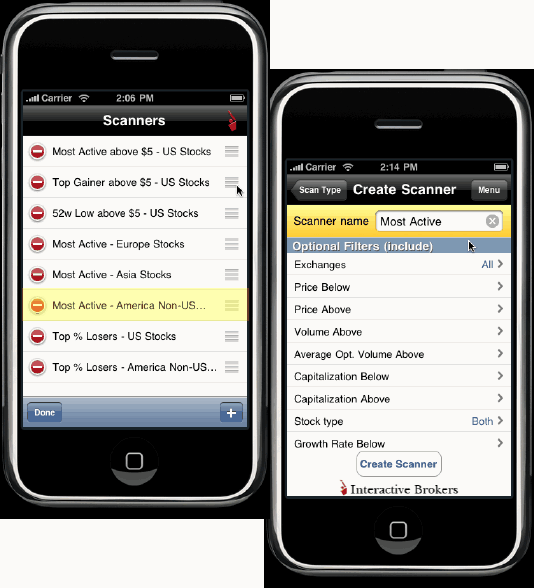
From the Main Menu, touch Scanners.
Touch Edit in the lower left corner of the screen.
Modified filter criteria as desired and touch Save Scanner.
Note: The available filter criteria changes based on the scanner you select.
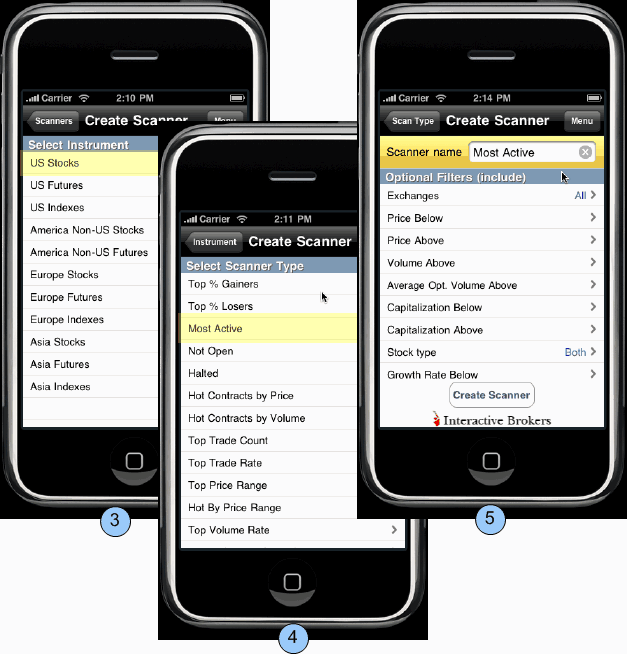
From the Main Menu, touch Scanners.
At the bottom of the Scanner window, touch the plus sign (+)
Select a region and instrument type (i.e. U.S. Futures, Europe Stocks, Asia Indexes)
Choose a scanner. Note that available scanners are based on the selected region/instrument.
Define optional filters (such as price range, minimum volume and P/E Ratio etc) and touch Create Scanner.